ThinkPHP微信公众号开发(三)
自动回复和图灵机器人接入
通过之前设置好的微信验证接口来获取事件(推送,消息,关注,扫码等),定义一个统一接收事件的方法reponseMsg,然后添加到微信接口方法里面,修改如下:
public function index(){
    $timestamp = $_GET['timestamp'];//时间戳
    $nonce     = $_GET['nonce'];//随机数
    $token     = 'guitutu';
    $echostr  = $_GET['echostr'];
    $signature = $_GET['signature'];
    $array     = array($token,$timestamp,$nonce);
    sort($array);//安字典序排序
    $tmpstr = join('',$array);
    $tmpstr = sha1($tmpstr);//加密
    if($tmpstr == $signature && $echostr){
        ob_clean();//清除缓存
        echo $echostr;//输出微信返回的随机串
        exit;
    }else{
        //捕获微信事件
        $this->reponseMsg();
    }
}
完善reponseMsg方法
public function reponseMsg(){
    //1、获取微信推送过来的post数据(xml格式)
    $postArr = $GLOBALS['HTTP_RAW_POST_DATA'];
    //2、处理消息类型,并设置回复类型和内容
    $postObj = simplexml_load_string( $postArr );//把xml转换成对象
    //消息推送事件(关注取消,点击菜单等)
    if( strtolower ($postObj->MsgType) == 'event'){
        //如果是关注subscribe事件
        if( strtolower($postObj->Event) == 'subscribe'){
            //回复用户消息
            $opendid = $postObj->FromUserName;
            $content = "现在才来呢~等你好久哟";
            $resText = new IndexModel;
            $resText->responsMsgText($postObj,$content);
        }
        //如果是扫码第二次扫SCAN事件,首次是关注
        if( strtolower($postObj->Event) == 'scan'){
            //...
        }
        //点击菜单事件
        if( strtolower($postObj->Event) == 'click'){
            //...
        }
    }
    //接收用户消息并回复
    if( strtolower ($postObj->MsgType) == 'text' && trim($postObj->Content)=='guitutu'){
        //多图文回复
        $arr = array(
            array(
            'title' => '百度',
            'description' => '百度一下,你就知道',
            'picUrl' => 'http://www.guitutu.com/abc.jpg',
            'url' => 'http://www.guitutu.com',
            ),
            array(
            'title' => '天猫',
            'description' => '上天猫,就够了',
            'picUrl' => 'http://www.guitutu.com/abc.jpg',
            'url' => 'http://www.guitutu.com',
            ),
        );
        $resText = new IndexModel;
        $resText->responsMsgImg($postObj,$arr);
    }else{
        if( strtolower ($postObj->MsgType) == 'text'){
            //文本回复
            $usertext = trim($postObj->Content);
            $content=$this->chat($usertext);
            $resText = new IndexModel;//暂由图灵机器人代管
            $resText->responsMsgText($postObj,$content);
        }
    }
} 我把自动回复方法放在了Model里面,方便统一调用,需要use Model\IndexModel一下,responsMsgImg(图文回复)和responsMsgText(文本回复)代码如下,里面的回复格式请参照官方说明,方法里的两个参数分别是转义后的XML对象和回复内容
class IndexModel{
    //图文回复
    public function responsMsgImg($postObj,$arr){
        $toUser = $postObj -> FromUserName;
        $fromUser = $postObj -> ToUserName;
        $time = time();
        $msgType = 'news';
        $template = "<xml>
                    <tousername><![CDATA[%s]]></tousername>
                    <fromusername><![CDATA[%s]]></fromusername>
                    <createtime>%s</createtime>
                    <msgtype><![CDATA[%s]]></msgtype>
                    <articlecount>".count($arr)."</articlecount>
                    <articles>";
        foreach($arr as $k=>$v){
        $template.= "<item>
                    <title<![CDATA[".$v['title']."]]></title>
                    <description><![CDATA[".$v['description']."]]></description>
                    <picurl><![CDATA[".$v['picUrl']."]]></picurl>
                    <url><![CDATA[".$v['url']."]]></url>
                    </item>";
        }
        $template.= "</articles>
                    </xml>";
        $info = sprintf( $template,$toUser,$fromUser,$time,$msgType);
        echo $info;
    }

    //文本回复
    public function responsMsgText($postObj,$content){
        //回复用户消息,文字
        $toUser = $postObj -> FromUserName;
        $fromUser = $postObj -> ToUserName;
        $time = time();
        $msgType = 'text';
        $template = "<xml>
                    <tousername><![CDATA[%s]]></tousername>
                    <fromusername><![CDATA[%s]]></fromusername>
                    <createtime>%s</createtime>
                    <msgtype><![CDATA[%s]]></msgtype>
                    <content><![CDATA[%s]]></content>
                    </xml>";
        $info = sprintf( $template,$toUser,$fromUser,$time,$msgType,$content);
        echo $info;
    }
}
最后接入图灵机器人,需要在图灵注册获得key,这里用chat方
public function chat($data){
    $str =$this->http_curl('http://www.tuling123.com/openapi/api?key=你自己的key&info='.urlencode($data),'get','json');
    //print_r($str);exit();
    $replytext = $str['text'];
    if($str['url']){
        $replytext .= '<a href="'.$str['url'].'">点击查看</a>';
    }
    if($str['list']){
        $item = $str['list'][0];
        $replytext .="\n".$item['name'];
        $replytext .="\n".$item['info'];
        $replytext .="\n".'<a href="'.$item['detailurl'].'">点击查看</a>';
    }
    return $replytext;
}
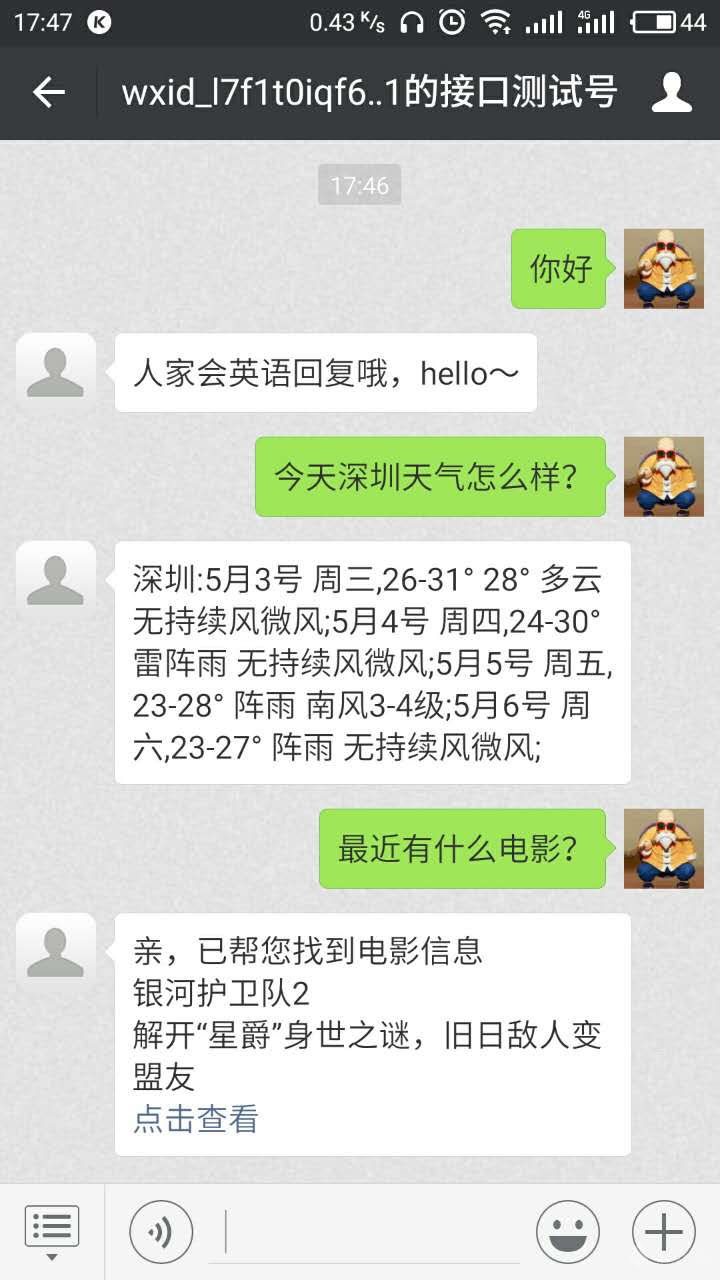
最终效果